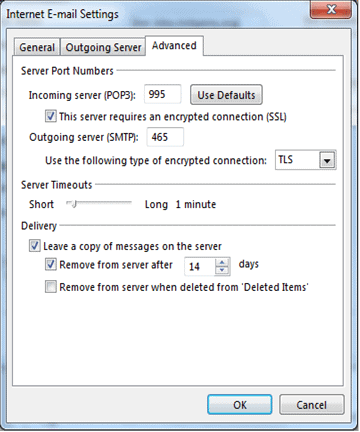
Click on the “FILE” menu. Click on the “Add Account” button. Check the radio box for “Manual setup or additional server types” then click the “Next >” button. Check the radio box for “POP or IMAP” then click the “Next >” button. Fill out all the fields on this screen. Your Name: The name people
These instructions will help you set Outlook 2003 up for Web Unlimited email. 1. Open the Add Email Account wizard and choose “Add a new e-mail account.” 2. Choose “POP3” (Note you can alternatively use IMAP, but keep in mind this will use space from your hosting account to store the messages). 3. Fill out
An MX record is a type of DNS record that defines where mail servers need to deliver any email that is sent to anyone on your domain. In order for your domain to be able to receive email messages at WebUnlimited, you must update the MX record values through your DNS host to point to
It is very easy to update your password to meet the new security requirements. In your browser, go to https://webmail.webunlimited.com Sign in just as you would normally. (NOTE: If you cannot remember your current password, please have your company administrator reset it. If you are a company administrator and cannot remember your password, please call