
The short version
- Enom has two websites: EnomCentral.com and Enom.com. Your login works on both, because they share the same backend.
- Your password can only be reset on Enom.com. The EnomCentral.com site can’t reset it.
- Your username (Login ID) can be looked up on EnomCentral.com, or found in the first sentence of any Enom renewal email.
- After resetting, go back to EnomCentral.com to renew or update your domain.
- EnomCentral phone support: (425) 974-4689, available 24/7.
Which site do I use?Step by stepEnom emailsCalling EnomFAQStill stuck?
Which site do I use?
Two websites, one account
Use the site that matches what you’re trying to do.
Log in · renew · update
EnomCentral.com
enomcentral.com/login.aspx
- Log in to your domain account
- Renew your domain names
- Change settings on your domains
- Recover a forgotten username (Login ID)
- Reset a forgotten password (use Enom.com instead)
Password reset only
Enom.com
cp.enom.com/help/SendPassword.aspx
- Reset a forgotten password
- The same username and password as EnomCentral
- Not where you renew (go back to EnomCentral to renew)
Did you use the old agnitekdomains.com site? Your login should be the same. That program was discontinued, and accounts are now managed directly through EnomCentral.
Step by step
Get back into your account in 3 steps
About 5 minutes. Have your domain name and the email address on the account handy.
1
On your email, or EnomCentral.com
Find your username (Login ID)
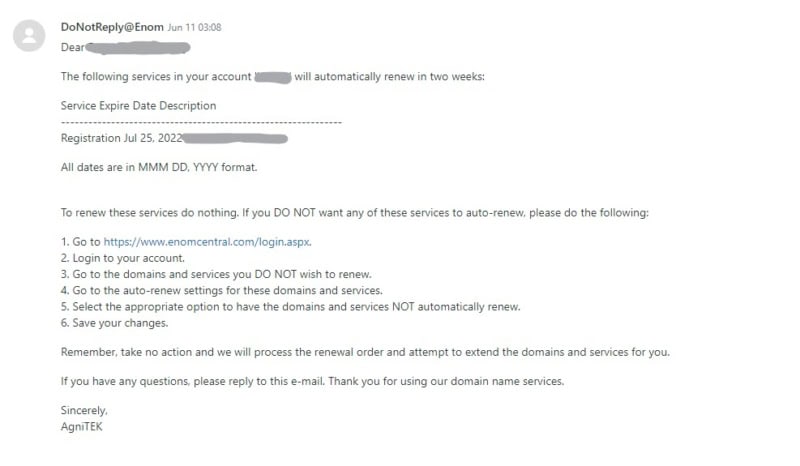
- Search your email for messages from Enom (see which addresses). Your username is usually in the first sentence, for example “The following services in your account ‘username‘…”.
- Can’t find one? Use EnomCentral’s Login ID recovery tool. Enter your domain name or the email address on the account.
2
On Enom.com, not EnomCentral
Reset your password
- Open Enom’s password page and enter your Login ID from step 1.
- Answer your secret question. If you never changed it, the favorite vacation spot answer may be
AgniTEK. - Follow the emailed instructions to set a new password.
Important: password recovery only works on the Enom.com side, not on EnomCentral.com. This is where most people get stuck.
3
Back on EnomCentral.com
Log in and renew
Go back to EnomCentral and log in with your Login ID and new password. It’s the same account. From there you can renew, register or update your domain names.
Is this email really from Enom?
Watch for these addresses
Renewal notices and account emails from Enom usually come from these domains:
- @enom.com
- @enomcentral.com
- @name-services.com
For example:
Your renewal notification email shows the username and email address Enom has on file, so keep it handy.
Still locked out? Call Enom
What to say when you call EnomCentral support
(425) 974-4689 · 24/7 phone support · EnomCentral Help Center
Before you call: find your renewal notification email (likely from [email protected]). It shows the username and email address on file.
Tell them:
- You have a “reseller retail” account that was set up originally through AgniTEK/WebUnlimited.
- You’re just trying to access your account through EnomCentral.com to renew your domain.
- You need their help to reset the password to gain access to your account.
- Give them your domain name and they can look up your username.
- They can also tell you which email address is on the account.
Some agents are more helpful than others, so have this information before you call. They are usually very helpful with recovering a password.
FAQ
Common questions
Why can’t I reset my password on EnomCentral.com?
EnomCentral.com is Enom’s portal for domains sold through partners. It can recover your username, but password recovery only works on Enom.com. Reset it there, then log in at EnomCentral.
Will my Enom.com password work on EnomCentral.com?
Yes. Both sites use the same backend, so the same username and password work on either one.
I used to renew at agnitekdomains.com. What happened?
Enom provided the technology behind agnitekdomains.com. They discontinued that partner program and now support domain customers directly. Your credentials should be the same as on the old agnitekdomains.com site.
Where do I find my username (Login ID)?
It’s usually in the first sentence of any Enom email (“The following services in your account ‘username’…”). You can also recover it on EnomCentral by entering your domain name or account email.
What’s my secret answer?
If you never updated it, the favorite vacation spot answer may be “AgniTEK”.
Who handles domain billing and renewals?
Enom handles all primary domain support directly. For billing questions, call EnomCentral at (425) 974-4689. WebUnlimited can still help on your behalf as part of our website, hosting and custom software support.
Still stuck?
We’ll help you get back in
If you’ve tried the steps above and Enom couldn’t reset your access, we can help through a support ticket.
Start here
Open a support request
Tell us your domain name and what you’ve tried. A ticket is required before we can help by phone.
After you have a ticket
(979) 696-2500
Call our office with your ticket number. We cannot provide phone support without a ticket.