Pushed from Authorize.Net: As you may be aware, an Internet-wide security issue, commonly referred to as POODLE, has been identified in the last two weeks and affects anyone using older Web browsers that use SSL version 3 (SSLv3), specifically Internet Explorer (IE) 6. This issue creates a vulnerability that could allow hackers to gain access
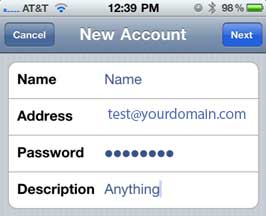
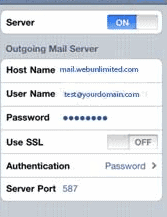
To setup the email account we will need: Internet connection:3G, 4G, Wifi Web Unlimited email: Username and Password Step 1 Enter your email address and passwordThen click the Manual Setup ButtonStep 2 Click on the POP 3 Account Button2 Step 3 Your username needs to be your full email addressThe POP3 server needs to be
Follow the directions below to set up a new email account inside of your Android phone. 1. Go to Email 2. Go to the Menu item inside of “Email” and click on the “Accounts” icon. 3. Click on “Add Account” 4. Set the following settings in the wizard: Incoming Settings: username – this will be
It is very easy to update your password to meet the new security requirements. In your browser, go to https://webmail.webunlimited.com Sign in just as you would normally. (NOTE: If you cannot remember your current password, please have your company administrator reset it. If you are a company administrator and cannot remember your password, please call